Last updated: January 21, 2026
Hi. Thanks for visiting. This site primarily serves as my own reference, but I’m publishing it online in case others find the Snippets useful too.
What’s a Snippet?
Each post on this site, i.e., each snippet, is a quick summary of an idea or insight gleaned from a YouTube video with the help of AI.
The goal is simple: make it easier to capture and revisit useful ideas without having to comb through YouTube’s Watch History, scrub through long videos, or search through transcripts.
Each snippet is meant to stand on its own as a concise takeaway that you can read in a minute or two. Think of each snippet as a distilled note from a longer conversation.
Each snippet also includes metadata that allows the interested reader to visit the source material.
How are Snippets created?
Behind the scenes, AI helps identify promising takeaways in videos and turn them into readable summaries.
Most takeaways are discarded, but once in a while, a video yields one or more useful takeaways.
These takeaways are handpicked, reviewed, and edited, with a focus on clarity, accuracy, and whether the idea is actually worth saving. A Snippet emerges on this site at the end of this curation process.
Learning by Doing
This site is also an experiment. I am exploring how AI can support thoughtful curation rather than replace it, by speeding up the boring parts while keeping a human in the loop for judgment and taste.
If you watch a lot of YouTube videos but struggle to remember exactly where you heard a particularly useful nugget of wisdom, then you understand the itch I’m trying to scratch with this site. I’d long wanted to do this kind of curation, but couldn’t find a sustainable way to do it until Claude Code came along.
The sections below describe the technical workflow for those interested in how Snippets are made.
The Detailed Workflow
This diagram shows how AI-generated drafts flow through human review before they’re published as snippets on this site.
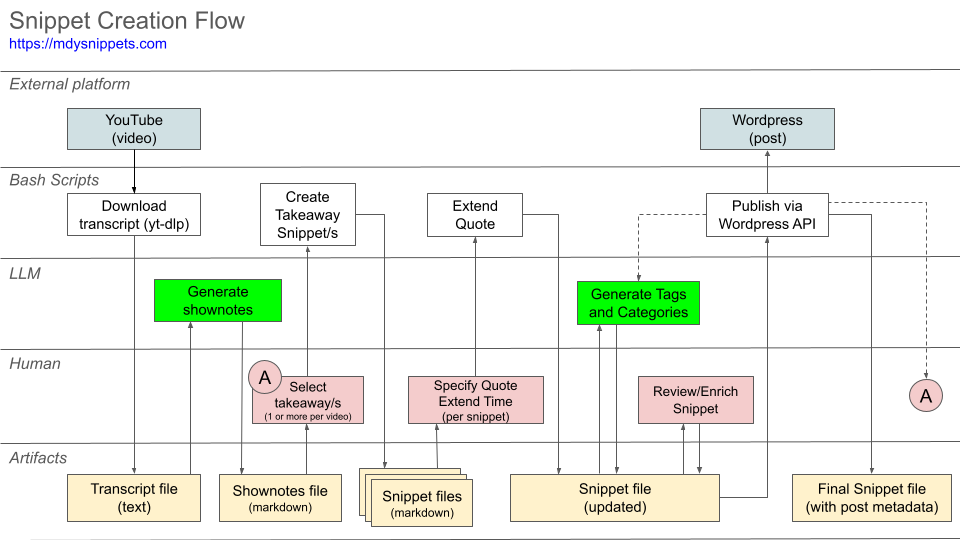
Step 1. Generate shownotes from transcripts
- I come across an interesting video;
- I use yt-dlp (triggered via a Raycast shortcut) to download the YouTube transcript to my local drive;
- I use an LLM (Claude Code or Gemini API) to generate shownotes, which are also stored locally.
The shownotes are markdown text files (one file per video), and each file contains a discussion of key takeaways for that particular video.
Examples: Transcript | Shownotes: Markdown or PDF
Step 2. Snippet Creation
If a specific takeaway is insightful and I want to note it for future reference, I use a snippet-creator script (written by Claude Code) to generate a new “snippet” markdown text file that contains:
- a short quote from the transcript that the takeaway is based on;
- a timestamped YouTube URL that goes to the portion of the video that the quote is from, so I can easily go back to watch it anytime;
- the LLM-generated takeaway text from the shownotes.
Once the snippet text file is created, the same script also opens the new file in my preferred text editor so I can review it.
Example: Snippet File
Step 3. Review and Publish
I review and finalize the newly-created snippet file:
- If needed, I expand the transcript quote using yet another script written by Claude Code; I just specify how many additional seconds of dialogue I want added to the start and end of the existing quote. I also manually trim down the quote as needed.
- I double-check that the YouTube URL goes to the right time on the video;
- I can invoke a taxonomy script (also written by Claude Code) that uses an LLM to suggest tags and categories. Sometimes, I’ll have a strong opinion about what the tags and categories should be, so in that situation, I prefer to manually add them myself;
- Finally, I tweak the takeaway write-up to add some personal commentary or to link to a related site.
When I’m happy with the snippet file, a final script (also written by Claude Code) publishes the Snippet to this blog via the WordPress API, adapting all the markdown entries to the Gutenberg blocks that WordPress expects. The same script updates the Snippet text file to record the WordPress post ID and public WordPress URL for the post.
Example: Published post
Version History
As I curate more Snippets, I refine the workflow with the help of Claude Code. Here are the notable updates since the first end-to-end curation workflow was created on January 4, 2026.
- v1.6.3 (2026-02-08): Jetpack Social now auto-shares post title as social media message on publish
- v1.6.2 (2026-01-23): Tables now support custom CSS classes via comment directives; added two-column 35/65 table class; fixed category ampersand encoding for ‘Strategy & Ops’
- v1.6.1 (2026-01-22): Scheduled blog posts now store proper WordPress permalinks
- v1.6.0 (2026-01-21): Taxonomy (tags and categories) now synced with WordPress
- v1.5.0 (2026-01-20): LLM can now suggest Tags and Categories
- v1.4.0 (2026-01-11): WordPress publishing now supports tables
- v1.3.0 (2026-01-08): Automate one-off takeaway addition
- v1.2.0 (2026-01-06): Added metadata for start/end time of quotes
- v1.1.0 (2026-01-05): Blogpost update capability + support for nested bullets
- v1.0.0 (2026-01-04): First WordPress publish + core blog workflow
